
The new mouse and webcam I ordered arrived yesterday. Both are from Logitech.
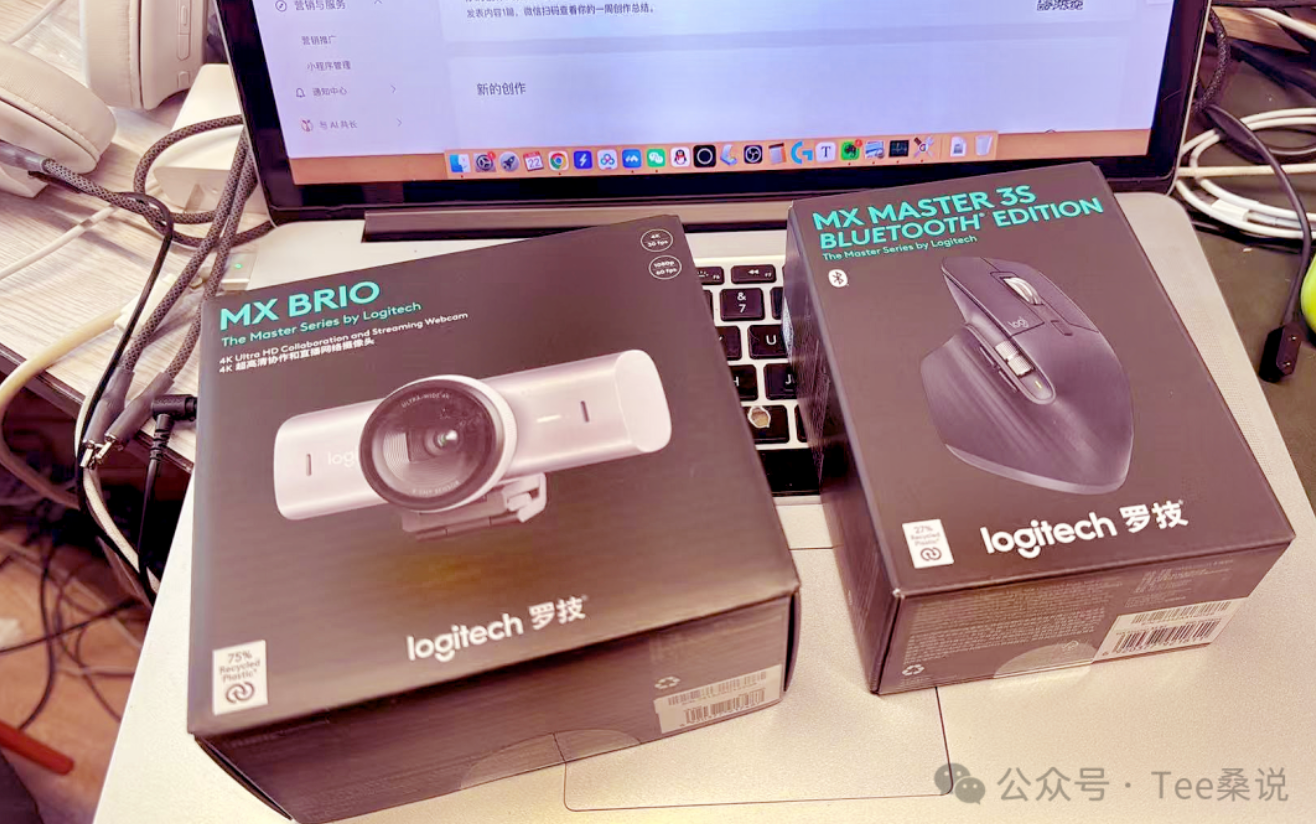
I changed the webcam because of my online watercolor classes. A couple of days ago, when I was sharing watercolor techniques, I was still using my phone as a camera connected to Tencent Meeting. It was convenient, but once the phone was fixed in place, zooming was awkward. The biggest problem was getting the colors right. Color accuracy matters so much in watercolor. Even a slight shift on screen means the student is seeing a different color.
My old webcams were also Logitech: two C920s that I had used for almost ten years, with only three megapixels. The new one has a USB-C connection, while the old ones used USB-A, so the connection has been updated to match my new laptop too. The picture quality has improved. I have kept the old ones for now. Perhaps one day I will try a setup with several cameras.
The mouse is also Logitech, from the MX series. Before buying it, I realized I had barely bought a non-Apple mouse in ten years. I had always used Apple's mouse, and had bought two or three of them. They look good, but after a long time they become uncomfortable. My palm and wrist were always held at an awkward angle.
What finally made me decide happened a few days ago. After an intense month of editing short videos, the hand I use for the mouse was hurting. Only then did I give it proper thought: this hand needed a different mouse, or at least a different position. It had become a real need.
The new mouse connects through Bluetooth and has three extra shortcut buttons I can configure. When I edit, my left hand hardly needs to leave the keyboard, and the difference in efficiency is noticeable. There is a condition, though: I need to build the muscle memory before it really becomes fast. I have been using it for two days and am still getting used to it. I expect it will feel natural in a few more days.
After changing those two things, I decided to take stock of the whole setup on my desk.
I had actually planned to do this every week
When I changed computers in June, I started a weekly journal on my WeChat account. I intended to write once a week about how the machine was working for me. I wrote two or three entries and stopped. Several months passed.
Looking back, that silence is an answer in itself. At the time, I thought I had no time to write. In fact, the machine had become part of my everyday life. I was using it every day, for hours at a time, with nothing new to report. It had become a piece of equipment I no longer needed to make a special point of talking about.
The journey from a new machine to one you barely notice is the process of it becoming essential.
In the first few weeks, I kept noticing whether it was fast or getting hot. Now I do not think about those things at all. I open it and work. So this is not really a weekly journal entry. Changing the accessories simply gave me a reason to look back at how the setup grew, one piece at a time.
First, how I chose this computer
I placed the order on the evening of June 21: a 14-inch Apple MacBook Pro with an M5 Pro chip, 48GB of memory and a 1TB drive. The price on Apple's website was RMB 20,999.
I did not agonize much over the configuration. Before buying, I watched a few videos. They all agreed on one thing: prioritize memory. My own thinking was simple. Within my budget, get as much memory as possible and save elsewhere where I could.
I was not sure about choosing 48GB when I ordered. Was it worth spending several thousand yuan more on something I could not yet fully use? I could not answer that then.
A week later, the answer appeared on its own. I opened Activity Monitor and saw that most of the 48GB was in use, with swap memory already coming into play. Surprisingly, the browser was using the most memory; the AI applications came after it. I had lots of browser tabs open, AI running, and design software open at the same time. Add them together, and 48GB was not especially spacious.
I thought I was buying room to spare. In fact, I was buying just enough.
I chose Apple's website because it offered interest-free installments. Paying more than twenty thousand yuan at once would have been a strain. Spread over a few months, it was an amount I could earn back within those months at my own pace. For me, this was working equipment, not a consumer treat. That was what made paying in installments make sense.
If I were looking only at the price, subsidies on Pinduoduo and JD.com made them cheaper. I do not deny that. I simply did not want to take a chance on a sales channel to save a few hundred yuan that week.
A few days after I ordered, Apple raised prices across the range. Memory and storage chip shortages pushed the whole computer lineup up by RMB 800 to 3,500, roughly twenty percent. When I saw the news, my reaction was one word: yes! For a moment I felt rather pleased with myself. What good timing.
Its only problem was that the system could no longer be updated
Before this one, I used a 15-inch MacBook Pro from 2013. I had used it for thirteen years.
The old machine was not slow. Its 16GB of memory and 512GB drive made it a configuration just below the top one at the time. It always ran smoothly. Browsing, writing, and simple edits in Jianying were all fine. I had never asked it to do especially heavy work, just light office tasks, which it handled perfectly well. The reason I waited so many years to replace it was precisely that it was enough. If it had really been sluggish, I would have changed it earlier.
The operating system reached its limit, and the software followed. I could not install the latest WeChat. Many new applications would open only to say that the system version was unsupported. None of the AI tools I wanted to use would run.
That year or so coincided with AI coming into public view. Once models such as GPT-4o appeared, everyone could use AI to make something: write an article or generate an image.
But I was not paying attention then. My computer could not install the tools, so I did not follow them. I had hardly entered that world at all. Looking back now, more and more people use AI and care about it. Back then, it was still a small circle. If you were not using it, you could be a long way from the door.
My only contact with AI at the time was through websites. I used DeepSeek and occasionally opened something to have a look. What really brought AI into my daily work was starting to use Get Notes at the end of last year. That was the first time I used it every day, and the first time I felt it could connect with the work I do.
Next, the ports on the machine
This 14-inch model has three Thunderbolt ports, an HDMI port, a MagSafe charging port and a card slot. I use almost all of them except the card reader.
The first Thunderbolt port connects to a 2TB external drive. I keep things I regularly need on it: reference materials, art books and backups of images collected for my WeChat account. I often unplug it to back up my phone or use it as external storage when shooting Log video away from home.
The second port connects to a hub. Two more things connect to that: the microphone and another 2TB external drive.
The third port stays flexible. Sometimes it connects to my new Vibe Key from Ulanzi, which uses a small receiver; sometimes it connects to the webcam. I plug in whichever I need and leave it empty the rest of the time.
The HDMI cable goes to a 27-inch 4K external monitor I bought on Taobao. I bought it because I needed a larger screen to spread things out. I have too many applications open at once: Jianying, Codex and the browser. The laptop's screen cannot fit them all, and constantly switching windows was frustrating. I had not bought a monitor for almost twenty years. This time I finally filled that gap.
At home, I generally leave the MagSafe cable plugged in. When I go out, I switch to a power bank through a USB-C port. I used my previous machine the same way, leaving it plugged in at home for more than a decade without giving battery care much thought. My thinking is simple: it is equipment for work, not something to be fussed over. If the battery eventually degrades enough that it cannot last outside, I will consider replacing the battery or the computer then. I do not spend my days worrying about it.
There are two things I do care about, though.
One is the keyboard. This machine's keyboard picks up fingerprints very easily. One touch leaves a mark, and I dislike looking at it. I tend to snack while working, so a little oil on my fingers makes it even more obvious. Later I bought a keyboard cover on Pinduoduo, and that helped a lot. I use an external Bluetooth keyboard most of the time anyway, so I rarely touch the built-in one. Having a cover there lets me relax a little.
The other is taking it out. I bought a transparent protective case that covers the outside when the laptop is closed. There are too many hard things in my bag, including the power bank and keys, that could knock against it. That layer is there to take the knocks.
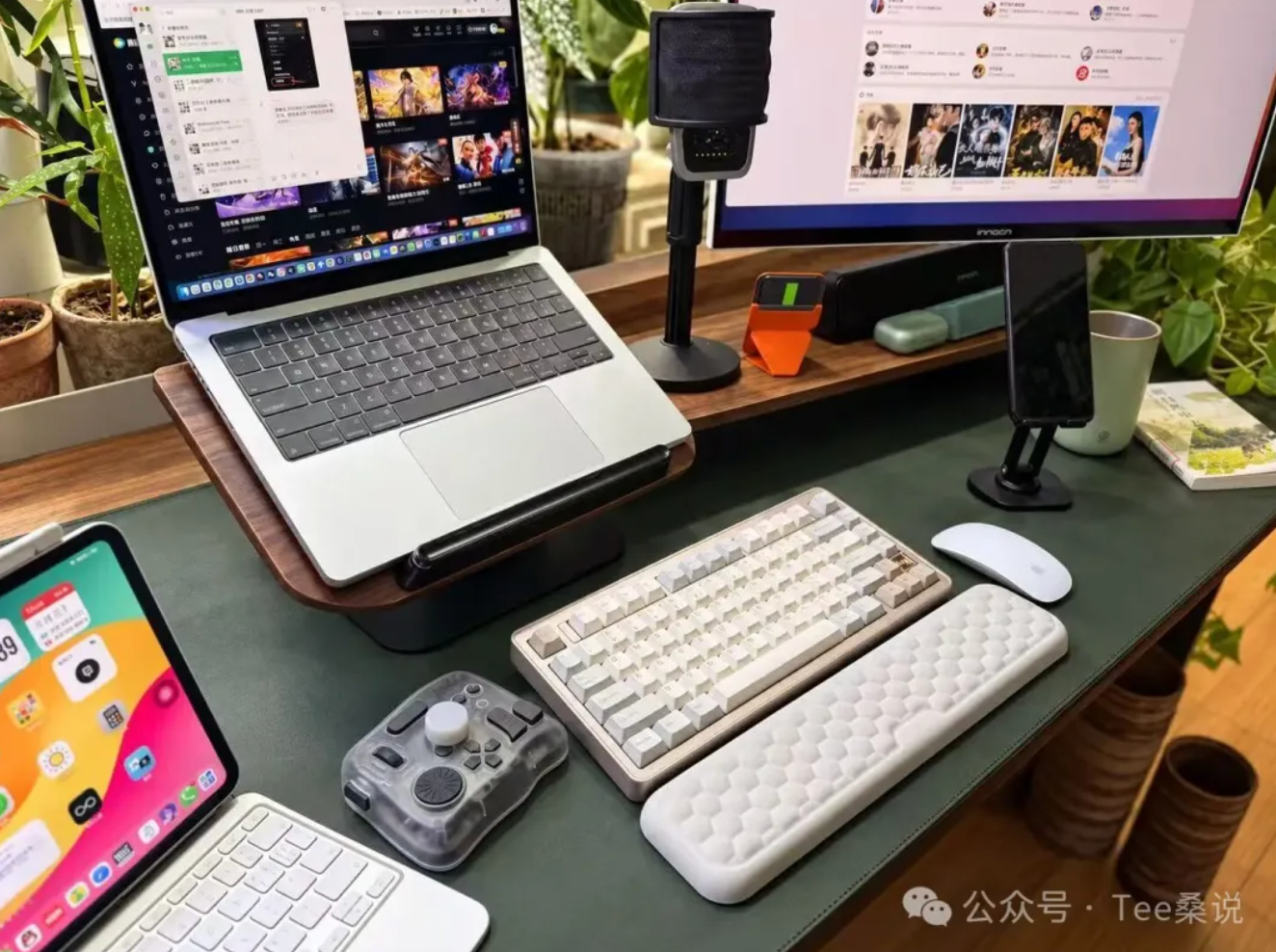
This setup grew. It was not designed in advance.
None of the things connected to those ports was part of an original plan. First there was the work. When the work reached a certain point, I added something. Not enough storage? Add a drive. Need more connections? Buy a hub. Too many things to plug in? Work out carefully what goes where.
Two other things on the desk are part of my daily routine
One is the TourBox I bought before May, a one-handed controller. I bought the Bluetooth version, so it does not take up a port. I mainly use it for video editing, and I have also set up some everyday shortcuts. I publish on WeChat every day, so I gave it a dedicated screenshot button. One press takes the screenshot, without clicking around with the mouse. Copy and paste are assigned there too. Little tools like this are hard to give up once you use them. After a while, your hand reaches for them automatically.
The other is the Shure microphone I bought long ago for podcasting. It connects through USB, so it needs a port.
That microphone has had an interesting life. I bought it to make podcasts, but did not use it very often then. It sat around for quite a while. What finally made it busy was my collaboration with AI.
Now I speak to AI a great deal every day, explaining what I need and what I am thinking. A microphone that captures my voice well has become essential. It works much better than the laptop's built-in microphone. It picks up what I say clearly so it can be turned into text. Sometimes I speak while a video is playing, and it can still capture my voice a little more clearly instead of everything blending together.
Something I bought and barely used became, years later, something I use every day.
I find that interesting. My iPad now spends most of its time as a second screen. When I run out of screen space, I extend the display wirelessly and put it beside me for reference. Or I simply work with AI while watching a show or playing a game to let my mind unwind. Having two screens open makes the afternoon feel more relaxed.
Plugged in at home, with a power bank when I go out
As for battery life, I mostly work at home with the power connected, so I have hardly thought about it.
I really noticed the difference when I was out. A while ago, I went to a crystal shop and needed to stay there for an afternoon. I took the laptop, thinking I could run a few AI generation tasks while I was there. I ended up keeping Codex running continuously, and the battery dropped quickly. After a little over three hours, less than four, I needed to find a socket.
Now I take a power bank whenever I go out: a big 25,000mAh, 165W one. Knowing I can charge the laptop puts me at ease. When I use it outside, I do not worry much about how long it will last. If the battery is getting low, I connect the power bank, just in case. This machine is actually quite economical when it is not doing heavy work. Ordinary writing lasts a long time. Continuous AI work is what really uses the power.
If I list everything on the desk, you will see that there is nothing unusual: a computer, an external monitor, a hub, two external drives, a keyboard and mouse, a microphone, an iPad, and the old computer I have kept. Each is ordinary on its own, and together they are nothing extraordinary either.
If they have one thing in common, it is this: every item was prompted by a specific task.
The webcam came from needing accurate colors in watercolor classes. The mouse came from a sore hand. The monitor came from running out of room for windows. The two drives came from running out of storage. The hub came from running out of ports.
None of it began with deciding to buy something and then building a setup around it. Each time, I was in the middle of working, realized the current arrangement would not do, and added that one thing.
So if you ask whether this is a setup worth copying, I cannot answer. Everyone's work is different, and so are the tools that work calls for. What I would rather say is that your own setup should not be copied from someone else's list either. It should grow as you work.
What grows with your work is what feels right in your hands.
Tee Sang | Painting, writing, and growing with AI
What did this bring to mind?
Share a memory, a different view, or a thought you would like to continue. No account is needed. Comments appear after review; readers’ words remain in their original language.
Leave a comment
Conversation
Loading comments…